Kling v3 AI Video Generator
Kling v3 generates cinematic footage in native 4K at up to 60fps. VideoGen drops every clip onto your editing timeline.
By Kuaishou · Kling 3.0 released February 2026 · First video model with native 4K output at up to 60fps
Example outputs from Kling v3
Real prompts, real outputs, generated with Kling v3 in VideoGen.

“Cinematic wide shot of an astronaut walking through red desert dunes toward a distant landing capsule, heat shimmer, dramatic score”
Generated with Kling v3 in VideoGen

“Close-up of raindrops racing down a train window at dusk, focus pulls to a passenger's reflection as city lights streak past, melancholic piano”
Generated with Kling v3 in VideoGen
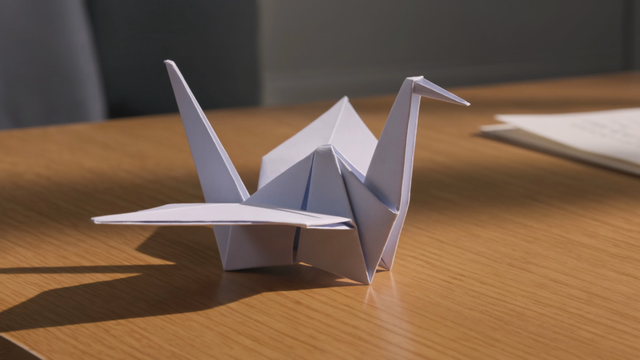
“A paper origami crane on a desk slowly unfolds, reshapes itself, and takes flight through an open window into a paper-craft world, whimsical multi-shot sequence”
Generated with Kling v3 in VideoGen
How VideoGen integrates Kling v3
| Max duration | 15 seconds per generation |
|---|---|
| Max resolution | Native 4K at up to 60fps |
| Native audio | Yes, in 5 languages with lip-sync |
| Multi-shot | Up to 6 camera cuts in one generation |
| Aspect ratios | 16:9, 9:16, 1:1 |
Quality tiers in VideoGen
- Low
The fastest and most affordable tier, built for drafts and quick iteration.
- Standard
The balanced default: good quality video clips at an everyday cost.
- High
Premium quality video clips for the content you publish.
- Max
MAX always integrates the state of the art. Kling v3 is part of that set.
Every quality tier routes each request to the best model based on our internal evals, compliance requirements, and your intent. Requests stay fully compliant at every tier: sensitive data is never routed to models hosted by foreign adversaries such as China.
How to use Kling v3 in VideoGen
Create a free account
Sign up for VideoGen to open the AI playground and editor.
Open a workflow
Start the storyboard to video or prompt to video workflow, or use the AI video tool inside any project.
Pick a quality tier or type a prompt
Choose the tier that fits your needs and describe what you want to create.
Generate and build your video
VideoGen builds the finished video with visuals, narration, and captions, ready to export.
Kling v3 API
Developers can generate video clips through the VideoGen API with the same quality tier routing as the app, so requests reach models like Kling v3 without managing provider keys.
curl -X POST "https://api.videogen.io/v1/tools/generate-video-clip" \
  -H "Authorization: Bearer $VIDEOGEN_API_KEY" \
  -H "Content-Type: application/json" \
  -d '{"prompt": "A drone shot over a coastal town at sunrise", "durationSeconds": 8}'
Cinematic AI video with audio
Generate top-tier clips with fluid motion, cinematic visuals, and native audio.
“VideoGen is awesome for scaling video production and improving turnaround time... The complex process of video editing, which could take days or months, now takes minutes!”
“VideoGen solves the biggest pain points of video production—complexity, cost, and time. In just a few clicks, anyone can create professional, copyright-free videos.”
“VideoGen is the most underrated tool for content creators who want to put out the highest quality content in the shortest amount of time.”
Frequently asked questions
Go from Kling v3 outputs to finished videos
Every VideoGen workflow uses models like Kling v3 automatically to build complete videos with visuals, narration, music, and captions.
Start creating with AI on VideoGen.
Sign in to generate images, video clips, and more with the models you choose.
Learn more
- Hailuo 2.3Cost-effective AI video with realistic motion
- Veo 3 PromptsCopy-paste Veo 3 prompt library with real generated outputs
- Gemini Omni FlashArena-leading AI video generation with conversational editing
- PixVerse V6AI video generation with lifelike physics
- Veo 3.1Next-generation AI video with improved realism and audio
- Grok ImagineAI video generation for everyday motion clips
- MinimaxAI video generation with realistic motion and cinematic visuals
- Wan 2.7AI video generation with smooth, coherent motion
- Sora 2 PromptsSora 2 prompt library you can run on today's best models